
WeChat Article Assistant
adf3950c-78b5-40c7-b066-03b86ef361c0WeChat Article Assistant combines topic research, writing, formatting, and visuals into one asynchronous task. Provide a subject area or topic to receive an article draft with headline options, a summary, Markdown and HTML, covers, illustrations, sources, and a review report. Use natural-language requests through a connected Agent or integrate via API. Customize the audience, style, length, and output language, then review the draft and upload assets before publishing.
- Published price
- $0.02 / call
- Billing
- Pay on delivery
- Delivery
- Task delivery
- Execution limit
- 3000 seconds
WeChat Article Assistant
$0.02 / call
OpenCode
On this page
Overview
WeChat Article Assistant
WeChat Article Assistant combines topic research, writing, formatting, and visuals into one asynchronous task. Provide a subject area or topic to receive an article draft with headline options, a summary, Markdown and HTML, covers, illustrations, sources, and a review report. Use natural-language requests through a connected Agent or integrate via API. Customize the audience, style, length, and output language, then review the draft and upload assets before publishing.
WeChat Article Assistant · From topic to formatted article draft
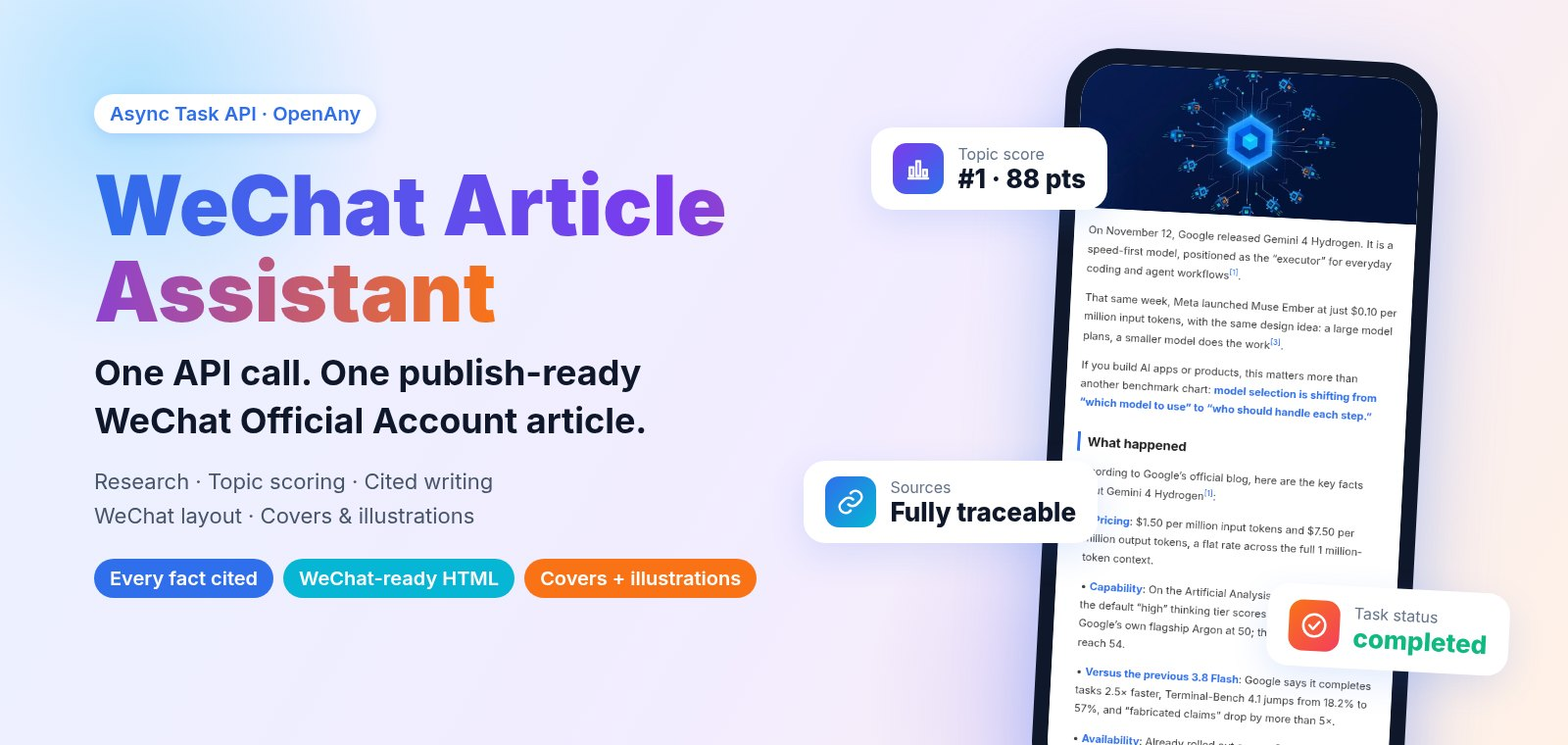
Provide a subject area or a topic and receive a sourced, formatted WeChat article draft with titles, a summary, covers, illustrations, and a review report. Built for independent writers, brand editors, and content teams, it combines research, writing, layout, and visuals in one task.
What you can use it for
When you need a topic: choose a domain and time window so the service researches recent developments and selects an angle.
When you already have a subject or URL: generate an article around that direction for a specific audience.
When you need a different format: choose news, analysis, tutorial, opinion, or listicle, then adjust tone, length, and illustration count.
When preparing a WeChat draft: collect HTML, Markdown, titles, and summary, then complete human review and upload assets.
Core capabilities
Capability | What you receive |
|---|---|
Research and topic selection | Recent-source research within the time window; automatic selection when |
Writing and citations | Five styles, sourced factual claims, and a reference list. |
WeChat layout | Inline-styled HTML plus editable Markdown. |
Covers and illustrations | Header and square covers; request 0–5 illustrations, with a default of 3. |
Review report | Body length, source count, unverified items, and pre-publication warnings. |
A look at the output
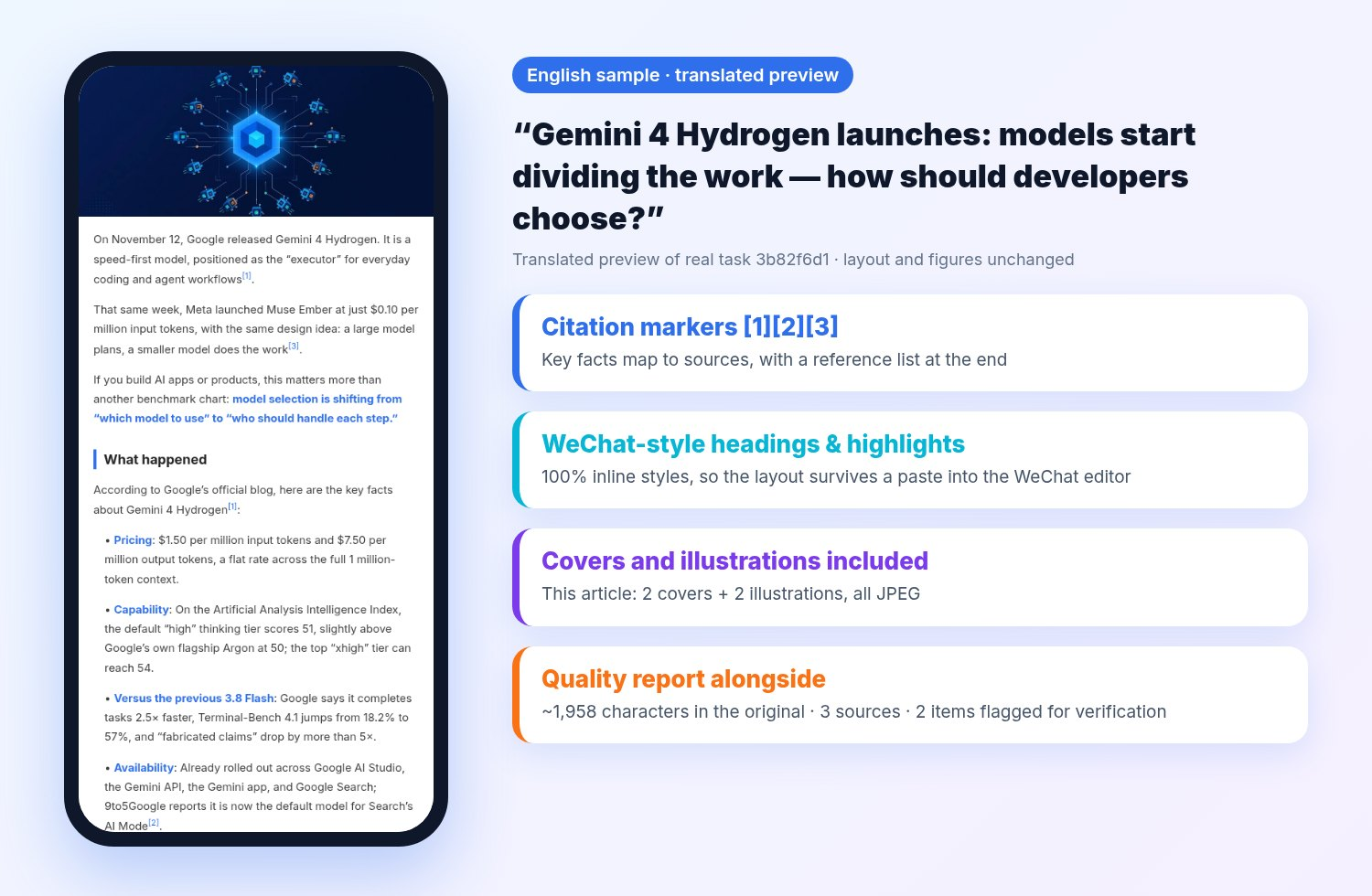
This image and its case come from a real test task documented in the supplied package. The image is an English translated preview of the original Chinese output, illustrating layout and deliverables rather than showing an original English-language run.
From request to delivery
Choose a domain / topic → research and select an angle → write with citations → format → create visuals → collect and review.
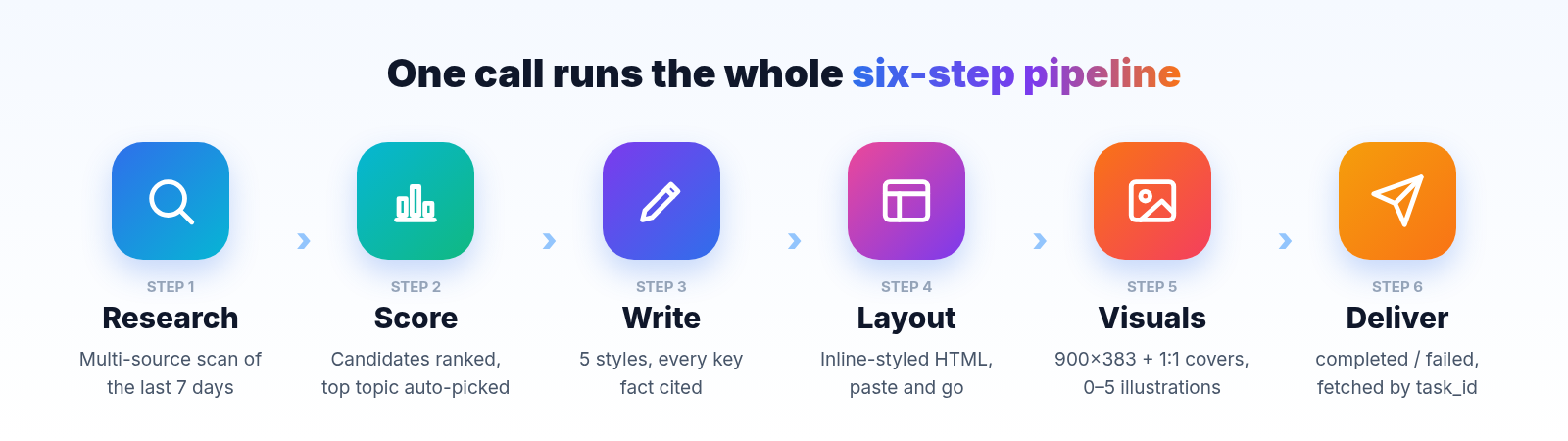
Delivery is asynchronous. Keep the task reference, poll the same task, and read result when complete. Allow processing time measured in minutes; the configured deadline and retention period on the listing control availability.
Before you buy
The default domain is tech / AI and the default output language is Chinese. Set language: "en" for English articles. Leave topic blank for automatic selection or provide a topic or reference URL.
One task delivers one article and supporting outputs. Uploading to the WeChat media library and automatic publishing are outside the scope. Review sources and warnings, upload images, and complete publication in your own account. The current listing controls price and billing unit.
Try this Run
Your inputs
Bring the details required by this listing.
Example
Three tasks. Three separate article drafts.
See each test result on its own: its headline, cover, body excerpt, illustration, and delivery record. All three tasks cover tech / AI in the same news cycle, but develop different editorial angles.
Case 01 | Explain how models divide the work
Gemini 4 Hydrogen launches: models start dividing the work — how should developers choose?

The request: specify a tech / AI domain, an audience, and 2 body illustrations; let the service choose the topic. The article explains why developers might move from choosing one model to assigning different parts of a task.
Body excerpt · English translated preview
If you build AI apps or products, this matters more than another benchmark chart: model selection is shifting from “which model to use” to “who should handle each step.”

The cover comes from this task. The headline and excerpt are the English preview retained in the source package, translated from the original Chinese article; the illustration is the packaged version.
Delivery item | Actual result |
|---|---|
Angle | Move from single-model selection to planning, execution, and verification roles. |
Body and sources | Approximately 1,958 Chinese characters and 3 sources. |
Images | 2 cover variants and 2 body illustrations. |
Supporting outputs | Recommended and alternative titles, summary, formatted body, and review report. |
Case 02 | From choosing one model to combining several
Gemini 4 Hydrogen launches: the strong model directs, the fast model executes

The request: automatically select a tech / AI topic from the past 7 days, for general practitioners and enthusiasts. Use analysis style, a professional and measured voice, and a target length of 2,000. This run takes the model-coordination angle.
Body excerpt · English translation of the Chinese output
Look at either model alone and it seems like another routine upgrade. What matters for people building with AI is the proposed workflow: let the strong model think and the fast model act, switching between them within the same session. That changes how you choose models and calculate costs.

The cover and illustration are original assets from this same saved task. The headline and excerpt above are translated for this listing.
Delivery item | Actual result |
|---|---|
Structure | What happened → capability changes → model coordination → implications → conclusion and sources. |
Body and sources | The report records 2,266 Chinese characters and 3 sources. |
Images | A 900×383 cover, a square cover, and 2 body illustrations. |
Headline choices | 6 candidates with different ways to frame the story. |
Review notes | Vendor-reported metrics, conflicting figures between sources, and image-upload steps. |
Case 03 | Explain cost per task through a pricing angle
Gemini 4 Hydrogen launches: fast models compete on getting work done, not just being cheap

The request: the same domain, audience, style, time window, and target length as Case 02, submitted as a separate task. This run approaches the story through pricing and task costs, with a different structure and focus from Case 02.
Body excerpt · English translation of the Chinese output
If a task that used to take several rounds can now finish in one or two, a higher unit price may still work out cheaper. But that depends on your actual task, so it is best to test it yourself.

This is a separate task’s cover and body illustration, rather than a visual variation of Case 02.
Delivery item | Actual result |
|---|---|
Structure | What happened → pricing and costs → model coordination → search experience → implications. |
Body and sources | The report records 2,269 Chinese characters and 6 sources. |
Images | A 900×383 cover, a square cover, and 2 body illustrations. |
Headline choices | 6 candidates covering pricing, search, and division of work. |
Review notes | Vendor-tested figures, pricing sources not directly re-checked, and media-upload requirements. |
What to compare across these cases
Angle: similar or identical inputs can lead to different structures and priorities within the same domain.
Complete drafts: each article has its own titles, summary, body, covers, illustrations, and sources.
Review report: each run identifies facts still to verify and steps to complete before publication.
These are historical test outputs, not new calls made for this revision. News, model names, prices, and performance claims belong to the articles at that time and need source checking before quotation. Actual image delivery may vary. Human review and media uploads are still required before publishing.
Included
One task, one article and supporting outputs
Each task produces one WeChat article draft around one topic, returning text, images, sources, and a review report in the same result object.
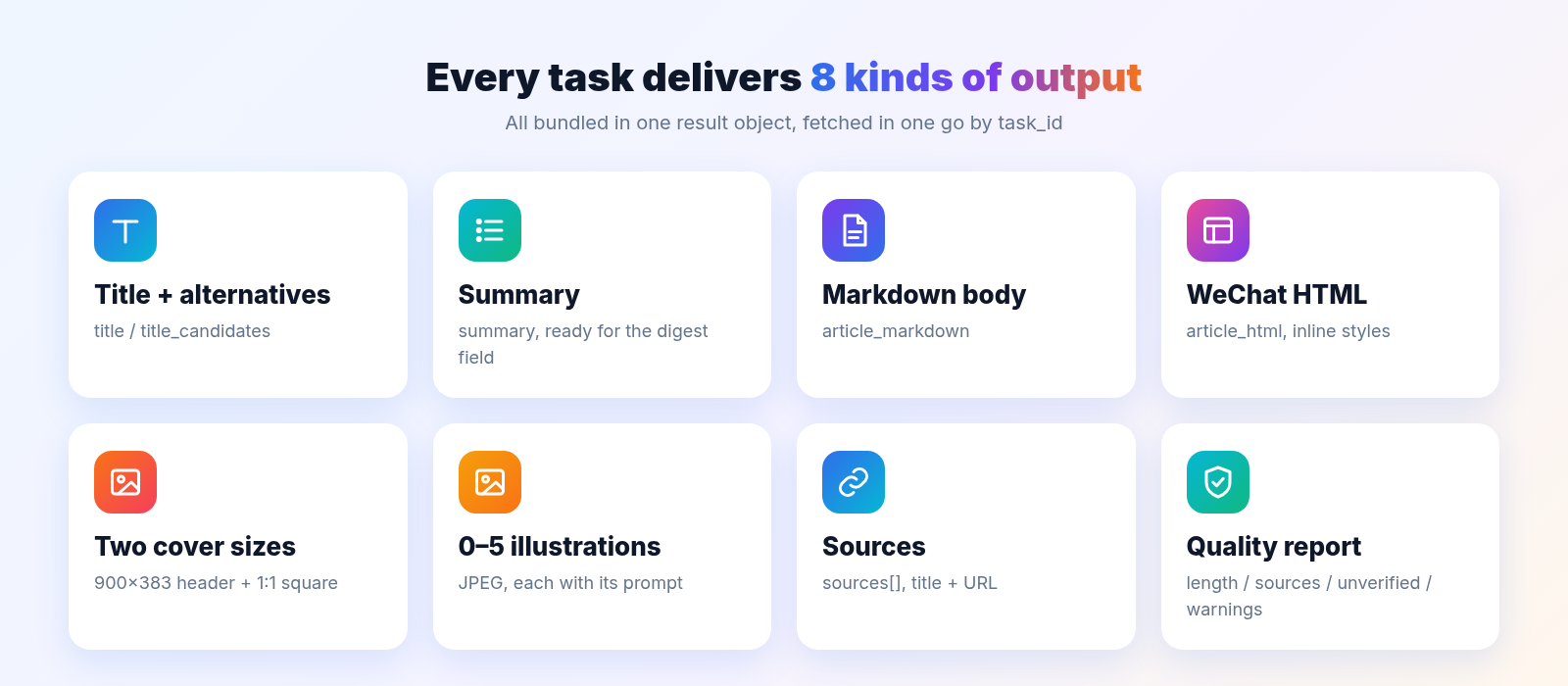
Deliverables
Item | Result field | Contents and form |
|---|---|---|
Recommended title |
| One main title. |
Alternative titles |
| Several angles for editorial selection; count follows the actual result. |
Summary |
| Short text to adapt for the WeChat digest field. |
Markdown body |
| Editable text for revisions and reuse. |
Formatted body |
| Inline-styled HTML; review the actual appearance in WeChat before publishing. |
Covers |
| The documented case includes a 900×383 header and a square cover. |
Illustrations |
| Request 0–5, default 3; records include name, MIME type, image data, and prompt. |
Sources |
| Titles and URLs for checking citations. |
Review report |
|
|
The illustration count excludes covers. Check actual image count, sizes, and formats on delivery. Use the product’s support route for missing items rather than automatically submitting again.
What to prepare
Provide a subject area, such as tech / AI, finance, or education, or specify a topic or reference URL.
Describe the audience and communication goal to help choose the angle.
Choose style, tone, target length, time window, output language, theme color, illustration count, byline, and closing text as needed.
params is a required object; its individual properties have defaults. Defaults include tech / AI, analysis style, target length 2,000, a 7-day window, Chinese output, and 3 illustrations.
How options change the result
Choice | Effect |
|---|---|
Blank | Research recent items in the domain and select a topic automatically. |
Supplied | Write about the topic or reference URL. |
| Choose |
| Request no body illustrations; covers are separate. |
| Request English output; an English listing page does not change the default. |
Scope and follow-up
Includes research, topic selection, writing, HTML layout, images, and a review report. Uploading to the media library, account login, automatic publication, and platform approval guarantees are outside the scope.
Decode or download images, upload them to your media library, replace image paths, choose a title, and review the body and sources before publishing. Check the actual byline and ending even when you provided explicit values.
Collection and retention
Retrieve result through the original task’s status endpoint. Decode data_base64 according to each image’s mime. The current listing controls processing deadlines, price, and retention. Follow returned expiry information such as result_expires_at and save outputs promptly. Do not resubmit just to retrieve the result.
How to use
How to use WeChat Article Assistant
A brief Agent guide comes first. The main API guide covers requests, task tracking, text and image delivery, and error handling.
Method 1: Use an Agent
In an Agent connected to OpenAny and able to call this product, describe the domain, topic, readers, and output:
Please use WeChat Article Assistant to select a tech / AI topic from the past 7 days for developers and product managers. Write an analysis in English with a target length of 2,000 and 2 body illustrations. Include titles, summary, body, sources, and checks to complete before publication.
Replace automatic selection with a topic when you already have one. The Agent submits an asynchronous task using supported parameters. Collect the article and assets, then review, upload images, and publish yourself.
Method 2: Call the API
Prepare parameters → submit → save the task reference → check progress → read text and images → review and publish.
1. Prepare access
Request:
POST, withContent-Type: application/json.Authentication:
Authorization: Bearer <your OpenAny API key>.Submission URL: copy the full URL from this product’s published API documentation into
SUBMIT_URLbelow.Request body: keep the
paramsobject, with all writing options inside it.Status:
GET /v1/agent-api-tasks/{task_id}in the same environment as submission.Price, deadline, and retention: follow current listing settings and returned task information.
2. Parameters
params is required. Individual properties may be omitted to use service defaults.
Property inside | Type | Default / range | Purpose |
|---|---|---|---|
| string | Tech / AI; max 50 characters | Subject area, such as tech / AI, finance, or education. |
| string | Empty; max 500 characters | Topic or reference URL; blank means automatic selection. |
| string | General practitioners and enthusiasts in the field; max 200 characters | Intended readers. |
| string |
|
|
| string | Professional, measured, conversational; max 100 characters | Writing voice. |
| integer | 2,000; 500–6,000 | Target body length; the report gives the actual count. |
| string |
| Research window; 1–2 digits followed by |
| string |
|
|
| object | Name |
|
| integer | 3; 0–5 | Requested body illustrations; covers are separate. |
| string | Empty; max 50 characters | Byline; blank leaves it unspecified. |
| string | Empty; max 300 characters | Closing text; blank leaves it unspecified. |
Chinese length is understood as character count. Check the current contract and actual report for English counting and delivered length. images: 0 requests no body illustrations. Review the actual byline and ending if you have strict requirements.
3. Minimum and full requests
Minimum request: domain only, with other defaults.
{
  "params": {
    "domain": "科技/AI"
  }
}
Full request: automatic topic selection, an English analysis, and 2 body illustrations.
{
  "params": {
    "domain": "Tech/AI",
    "topic": "",
    "audience": "Developers and product managers who follow AI",
    "style": "analysis",
    "tone": "Professional, measured, conversational",
    "word_count": 2000,
    "time_window": "7d",
    "language": "en",
    "theme": {
      "name": "default",
      "primary_color": "#2F6FEB"
    },
    "images": 2,
    "author": "Your byline",
    "footer": "Follow us for a weekly AI roundup."
  }
}
Set topic for a specific subject or style: "tutorial" for a tutorial. Explicitly use language: "en" for English; the minimum example retains Chinese output. Lower target length and fewer illustrations reduce work without guaranteeing a completion time.
4. Submit and save task details
Set your own OPENANY_API_KEY and save the request as request.json. Generate a new idempotency key for a new task and reuse it for network retries of that same request.
SUBMIT_URL='[Replace with this product’s published full submission URL]'
IDEMPOTENCY_KEY="$(uuidgen)"
curl --request POST "$SUBMIT_URL" \
  --header "Authorization: Bearer $OPENANY_API_KEY" \
  --header 'Content-Type: application/json' \
  --header "Idempotency-Key: $IDEMPOTENCY_KEY" \
  --data-binary @request.json
HTTP 202 indicates acceptance. This illustrates the platform response using demonstration references:
{
  "task_id": "22222222-2222-4222-8222-222222222222",
  "request_id": "request-example",
  "idempotency_key": "example-article-request",
  "status": "reserve_pending",
  "status_url": "/v1/agent-api-tasks/22222222-2222-4222-8222-222222222222"
}
Keep these references. Acceptance does not mean the article is finished or billing has settled.
5. Track the same task
Use the same API origin as submission. The example uses the production origin; replace TASK_ID with the returned reference.
BASE_URL='https://api.openany.si'
TASK_ID='22222222-2222-4222-8222-222222222222'
curl --request GET "$BASE_URL/v1/agent-api-tasks/$TASK_ID" \
  --header "Authorization: Bearer $OPENANY_API_KEY"
You may also use status_url, prepending the same API origin when it is relative. The source package suggests 1–2 minute intervals; follow current interface requirements.
State | Action |
|---|---|
Accepted, dispatched, or processing | Wait and check the original task, without resubmitting. |
| Read |
| Inspect |
6. Read the article and images
This is a structural excerpt. Long text and image content are omitted:
{
  "task_id": "22222222-2222-4222-8222-222222222222",
  "status": "completed",
  "billing_status": "settled",
  "result": {
    "title": "Example article headline",
    "title_candidates": ["Example article headline", "Another headline angle"],
    "summary": "Example summary for editorial review.",
    "article_markdown": "# Example article headline\n\nBody excerpt...",
    "article_html": "<section style=\"line-height:1.75\">Body excerpt...</section>",
    "images": [
      {
        "name": "cover-900x383.jpg",
        "mime": "image/jpeg",
        "data_base64": "...",
        "prompt": "Excerpt from the cover prompt"
      }
    ],
    "sources": [
      {
        "title": "Source title",
        "url": "https://example.com/source"
      }
    ],
    "report": {
      "word_count": 1958,
      "source_count": 3,
      "unverified": ["Item to verify"],
      "warnings": ["Action before publication"]
    }
  }
}
Deliverable | Fields | Next step |
|---|---|---|
Titles and summary |
| Select a headline and review the digest. |
Article |
| Edit, move the HTML into your WeChat workflow, and check layout. |
Covers and illustrations |
| Decode |
Sources and checks |
| Review facts and warnings rather than treating open checks as confirmed. |
The value data_base64: "..." is an omitted example and cannot be decoded. Use complete image data from an actual result. Do not embed it in the product listing. Follow any actual attachment download location and expiry.
7. Review, publish, and handle failures
Upload images to your own WeChat media library and replace local or temporary paths.
Choose the title and summary, then review facts, citations, byline, and ending.
Review every item in
report.unverifiedandreport.warningsand check the delivered image count.Save text and images before
result_expires_ator the published expiry. The service does not publish on your behalf.
Service-documented code | Meaning and response |
|---|---|
| Check lengths, allowed values, image count, and color syntax. |
| Specify a topic or adjust the window before deciding whether to create a new task. |
| Preserve the task and error details and use the support route. |
| Check the original task before creating another one. |
| Retain task and request references and follow support guidance. |
The service’s error.code and the platform status endpoint’s failure_code describe different layers; follow the actual response. After interruption, check original acceptance first. Changed requirements or another run generally require a new task; retries, failure charges, and refunds follow current listing rules.
Seller

OpenCode
一个代理,覆盖所有界面。在桌面上开始会话,在手机上引导它,在终端里接着做,或用自己的代码驱动它。
OpenCode 是一个开源编程代理,随时随地为您工作。连接200 多家提供商的AI 模型,包括Claude、GPT 和Gemini,也可以免费开始
More from this seller
小红书标题生成与优化(ZIP 文件交付)
面向小红书内容创作者的标题生成与优化 Skill。提交笔记主题、目标读者、真实素材、卖点和希望覆盖的搜索或推荐场景后,服务生成多条候选标题、评分与风险提示,并以 ZIP 文件交付中文报告 report.md 和标题表 titles.csv。买家先获得异步任务编号,完成后查询任务状态并下载文件。每个成功交付的任务收费 0.05 美元;失败或超时任务不收取成功任务费用。本服务不代发笔记,也不保证点击率、流量或转化效果。
space-xhs-title
面向小红书内容创作者的标题生成与优化 Skill。提交笔记主题、目标读者、已有素材、真实卖点以及希望获取的搜索或推荐流量,服务会先梳理内容简报,再结合小红书标题方法生成多条候选,对候选标题进行评分并提示夸大表述、事实不足等风险,按搜索、推荐和收藏等用途推荐标题,并给出 A/B 测试建议。接口采用异步交付:提交请求后获得任务编号,查询任务状态获取完整中文结果。每个成功任务收费 0.05 美元,失败或超时任务不收取成功任务费用;不包含笔记发布或平台流量效果承诺。

zai-org/GLM-5.3
GLM-5.3 is a long-context reasoning model for software engineering, security analysis, and agent tasks that span multiple steps. Call the chat completions endpoint with this model ID and a messages array. The model also supports tool calling.
AIHOT Monthly Report Archive
List published monthly reports from newest to oldest. Send a GET request without a body and optionally set limit to control how many archive entries are returned. Use the month from an item to request that report or follow its AIHOT link.
区块链资讯
对指定时间窗口内的区块链公开资讯做有来源支撑的简报整理。调用方可按需指定关注板块(新项目、空投、热门代币,以及可选的主流币大事、监管政策、技术进展)、公链、关键词、时间范围、每板块条数、输出语言和报告深度;也可以不传任何业务参数,此时默认覆盖新项目、空投和热门代币,时间窗口为过去 24 小时。接口以异步任务受理:买家向 OpenAny 测试网关提交 POST 请求后先获得任务受理结果,整理完成后由卖家向平台回调提交今日要点摘要、完整 Markdown 简报(JSON 结果中的 report_markdown;若要求文件则另附 blockchain-news.pdf)以及来源列表。本服务只整理已公开、可核对的信息,不构成投资建议,也不对价格涨跌或空投收益作出承诺。适用于投研值班、社群运营和产品情报跟踪。本稿供上架确认,提交前可由卖家修改。
Logo 设计
提供「Logo 设计」。调用方须提交品牌名,并可按需指定行业、风格偏好、配色、文字模式(纯图形 icon、纯文字 wordmark、或图文组合 wordmark+icon,默认图文组合)、口号、方案数量(1 到 5 个,默认 3)、其他要求和说明语言(默认 zh-CN)。接口以异步任务受理:买家向 OpenAny 测试网关发送 POST 后,先获得任务受理结果;完成后由卖家向平台回调提交摘要、结构化结果(brand_name、concepts、recommended)以及完整设计说明(JSON 合约下为 report_markdown;若要求文件则另附 logo-concepts.pdf)。交付为 PNG 位图方案和设计说明,不提供 SVG 或 AI 等矢量源文件,也未做商标检索,正式使用前请自行检索。适用于需要快速获得多个 Logo 方向草案的品牌或产品场景。本稿供上架确认,提交前可由卖家修改。